Quick answer: iWrote is a Markdown writing app whose current App Store listing explicitly says it supports iPhone Duo. That makes it a relevant option for someone searching for iPhone Duo apps or a writing app for iPhone. Its strongest fit is a complete writing loop—draft, organize, review, revise, and read—not a promise that every iOS Split View arrangement or every screen layout has been independently tested.
Why a writing app makes sense on iPhone Duo
Apple describes iPhone Duo as a foldable phone with a 7.6-inch inner display and a 5.4-inch outer display. The larger inside screen is designed for more than viewing bigger text: Apple’s launch information highlights two-app multitasking, including Split View, and the ability to save pairs of apps for later. That creates a useful setting for longer tasks such as drafting, editing, and reading source material.
A writing app can make that extra room useful in two ways. First, the document itself has more space for a longer paragraph or outline. Second, a writer can move through separate stages—capture an idea, structure it, edit it, then read it as finished prose—without turning the phone into a row of unrelated tools. The display does not make writing effortless by itself; a focused workflow and readable controls matter more than screen size alone.
iWrote’s App Store listing names iPhone Duo support and describes a Markdown editor for drafts and notes, Focus Mode, Style Check, an outline, revision history, Reader mode, themes and typography, and Markdown import and export. These features map to the writing stages that benefit from having more room: structure, draft, inspect, and review.
What you can do in iWrote
Draft in Markdown without leaving the writing task
Markdown is a lightweight way to mark headings, lists, emphasis, and links using plain text. It can be useful for notes and longer drafts because the source remains readable and can be moved between compatible tools. iWrote is presented as a Markdown writer for drafts, notes, essays, planning, journaling, and other long-form work. If you already keep notes in Markdown, its import and export options can help you keep a portable copy rather than lock every paragraph into one editor.
For a first draft, a simple structure is enough: add a title, create a few section headings, and write one idea under each. On a wider screen, the outline can make the shape of an article or essay easier to review before you polish sentences. The goal is not to format as you write; it is to keep the argument or story visible while the draft grows.
Use Focus Mode when the wider screen feels busy
A foldable display offers more working area, but more visible controls can also create more distractions. iWrote lists a Focus Mode that highlights the sentence being written. That can be useful when revising a paragraph or composing on the inner display: keep the current thought central, then leave Focus Mode to navigate the outline or draft list when you need the broader context.
Review language with Style Check
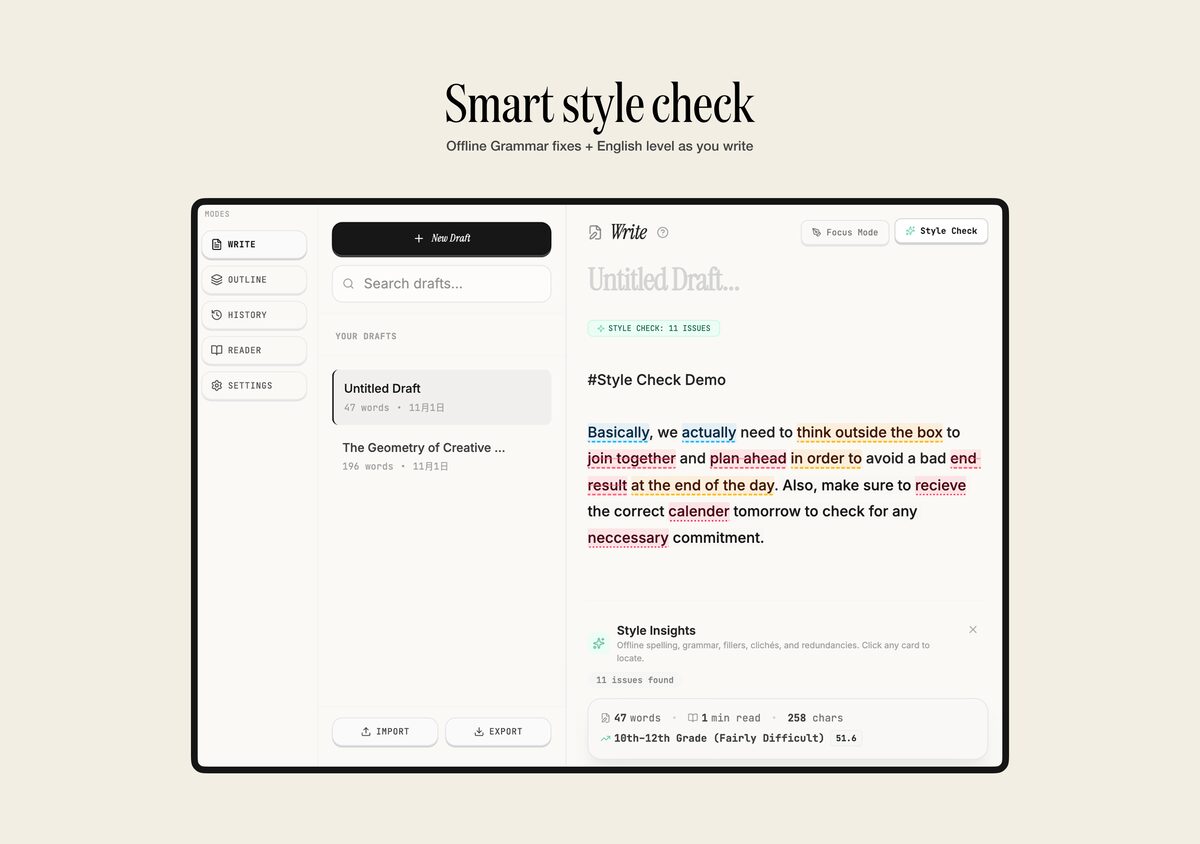
The App Store listing says Style Check looks for fillers, clutter, clichés, and typos. The screenshot supplied with this guide labels the feature “Offline Grammar fixes + English level as you write” and shows suggested issues highlighted in a sample draft. It also presents a reading-level estimate for that example. Those are product-interface details, not an independent accuracy study: automated suggestions can miss context, misread a deliberate voice, or propose a change that weakens meaning. Treat each suggestion as something to review, not an instruction to accept.
If the “offline” label reflects how the feature works, local review may suit writers who prefer not to send draft text to a cloud-based writing service. We have not independently verified the feature’s network behavior or performed a privacy audit. For sensitive writing, check the app’s current privacy details and test the workflow with non-confidential text first.
Move from outline to revision history to Reader mode
An outline helps reorganize sections before you spend time polishing them. Revision history provides checkpoints to revisit if a rewrite removes something you want back. Reader mode lets you inspect the draft as a more finished page, which can make repeated headings, awkward transitions, or overlong paragraphs easier to notice.
On iPhone Duo, a practical sequence might be: outline a short article, draft one section at a time, run Style Check after the main ideas are in place, restore an earlier checkpoint if an edit went too far, then read the clean version from top to bottom. That is a proposed workflow based on the listed features, not a claim that we conducted a hands-on test of every step on the physical device.
Does iWrote work with iPhone Duo Split View?
The App Store listing explicitly includes iPhone Duo among its supported devices. Apple’s iPhone Duo guide documents Split View for opening two supported apps side by side, or two windows from one app that supports multiple windows. A writer might want to keep a source, message, or reference beside a draft. However, the App Store support label alone does not verify every app pair, multitasking gesture, or internal iWrote layout.
For a real setup, open iWrote on the inner display, then try the Split View steps in Apple’s current user guide with the second app you actually use. Confirm that both apps appear as options, that the document remains readable at the chosen size, and that your draft is saved before switching away. If a pairing feels cramped, use iWrote full screen and switch between apps instead. See our iPhone Duo setup and Split View guide for Apple’s device basics.
Who might like this iPhone writing app?
- Markdown users: people who want plain-text-friendly drafts and import/export rather than a format tied to one editor.
- Students and essay writers: people who benefit from outlining, revising, and reading a draft in one workspace. Style suggestions still need human judgment.
- Journalers and planners: people who want a quiet space for recurring notes and longer reflections.
- Writers trying iPhone Duo: people who want to use the inner display for a longer document and want an app whose listing names device support.
It may be less useful if you need collaborative editing, a particular cloud-sync provider, complex publishing tools, or a verified multiwindow workflow that is not shown in the current listing. Check the App Store details and test your own setup before moving an established writing system.
Is iWrote free, and what should you check first?
When checked for this article, the US App Store listing showed iWrote as free, version 1.0.6, with a minimum requirement of iOS 16.4. Prices, feature availability, and compatibility can change, and store listings vary by region. Confirm the current listing for your country and device before downloading.
The app was newly released, so this guide is based on its current product listing and the supplied interface screenshot rather than a long-term independent review. Before relying on it for important work, try a small draft: create headings, run Style Check, export a Markdown copy, and confirm you can reopen it. Test any offline or privacy-sensitive behavior with non-confidential text first.
Frequently asked questions
Does iWrote support iPhone Duo?
Yes. The current US App Store listing for iWrote: Markdown Writer App names iPhone Duo support. The listing does not by itself verify every Split View pairing or layout, so test your preferred setup on the device.
Is iWrote a Markdown editor for iPhone?
Yes. Its listing describes a Markdown editor for drafts and notes, plus Markdown import and export. The App Store says it requires iOS 16.4 or later at the time checked.
Does iWrote have an offline grammar checker?
The supplied product screenshot describes an offline grammar and style check, and the App Store listing describes Style Check for fillers, clutter, clichés, and typos. We have not independently audited its network behavior or measured suggestion accuracy.
Is iWrote the best writing app for iPhone Duo?
“Best” depends on whether you need Markdown, collaboration, cloud sync, publishing tools, or a particular privacy model. iWrote is a relevant option to evaluate because its current listing names iPhone Duo support and includes writing and revision tools; this is not a comparative test of every iPhone writing app.